For construction companies and technical offices
Standardize your quantity takeoff and cost estimation workflows
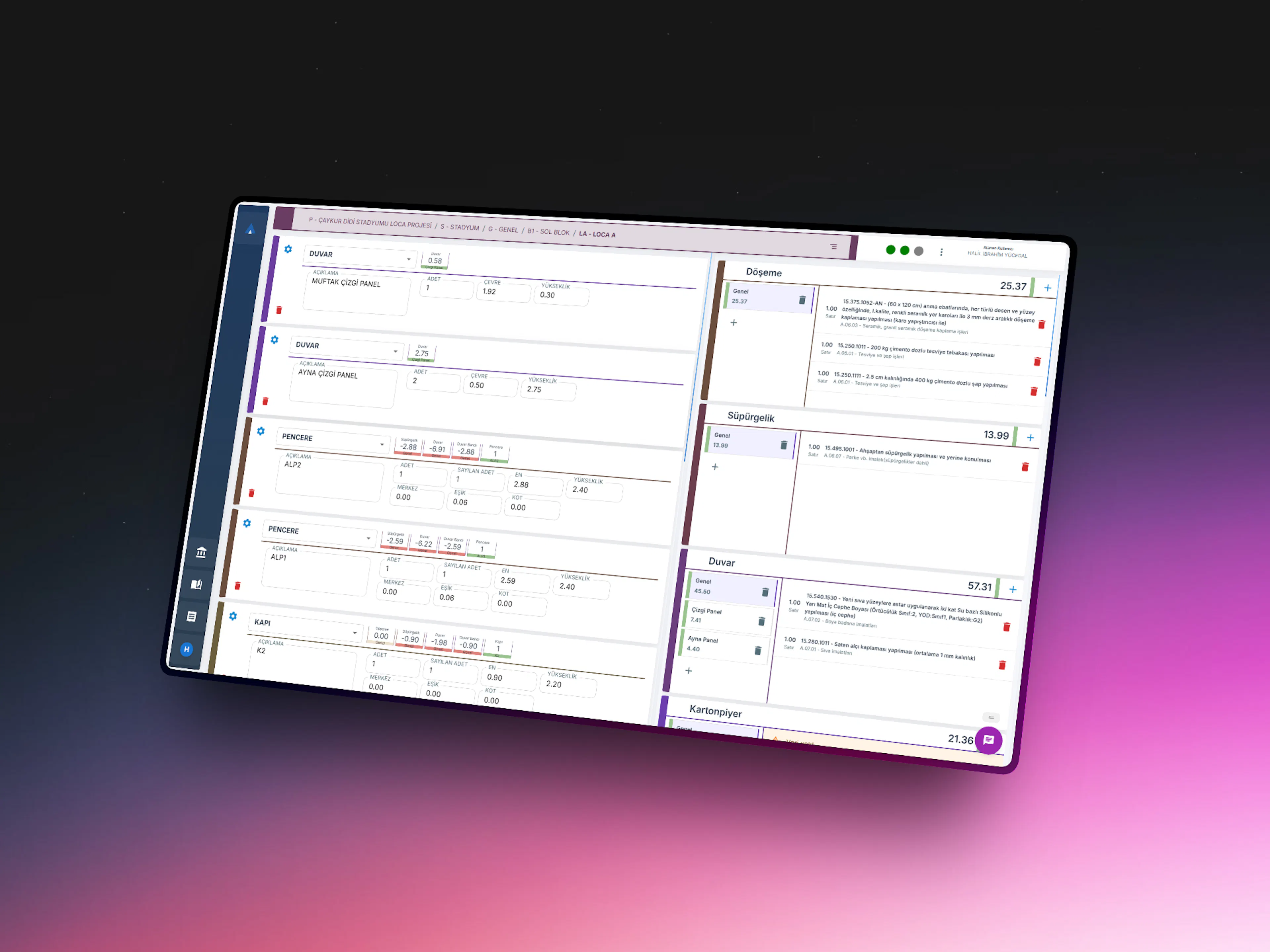
Approx is a cloud-based quantity takeoff and cost estimation software with AutoCAD integration. It turns drawing measurements into standardized takeoffs with formula-based templates, prices them with current public unit prices and produces customizable reports, so your whole team works to one standard.
Create a free account and access current public unit prices right away.
Move from Excel-dependent, person-dependent processes to an institutional cost production system.
Trusted by
Leading teams build with Approx
 Emlak Planlama İnşaat Proje Yönetimi ve Ticaret A.Ş.
 Data Mühendislik ve Müşavirlik A.Ş.
 Teknikhane Mimarlık Mühendislik LTD. ŞTİ.
Who is it for?
Approx creates the most value for these teams
Designed especially for teams managing multiple projects at the same time and looking to standardize quantity takeoff and cost estimation workflows.
Contractor Firms
Technical office, planning, and quantity takeoff teams
Makes Excel-based, person-dependent, and revision-heavy cost estimation workflows more manageable.
- Cost estimation
- Budget and planning support
- Revision management
- Standardized reporting
Construction Consultancy Firms
Teams preparing tender files and project-supporting technical documents
Helps consolidate project data from different sources and produce more structured, detailed, and standardized technical documentation.
- Tender file preparation
- Cost estimation
- Specification-supporting documents
- Detailed project outputs
Common challenges
Cost estimation workflows are still fragmented in many firms
Workflows split across multiple tools often lead to inconsistent standards within teams and major time loss during revisions.
Excel and single-person dependency
Quantity takeoff and cost studies often depend on one person’s spreadsheet structure and personal workflow.
CURRENTLY
Work progresses through person-specific files; when team members change, knowledge is often lost.
WITH APPROX
All work is managed within a shared company structure; everyone works with the same standard.
Rework during revisions
When a project changes, reports and supporting tables often need to be rebuilt manually.
CURRENTLY
When the project changes, reports and tables usually have to be prepared again from scratch.
WITH APPROX
Update quickly on top of the existing structure; revisions do not create a separate workload.
Loss of standardization across teams
When multiple people work on the same project, methodology, quality, and output format can vary.
CURRENTLY
Different people work with different methods; outputs and quality become inconsistent.
WITH APPROX
Everyone works with the same templates and formulas; results become repeatable.
Disconnected data flow
Moving data between AutoCAD, Excel, reports, and other systems creates additional operational overhead.
CURRENTLY
Data is moved manually between AutoCAD and Excel; the risk of errors increases.
WITH APPROX
Data flows automatically; the need for manual copying is eliminated.
Why Approx?
Speed, accuracy, and standardization in one system
Approx helps teams make cost estimation more structured while maintaining the same quality standard across the organization.
Formula-based standardized production
Turn quantity takeoff calculations that normally span many rows into a faster, repeatable workflow using predefined formulas.
High-accuracy cost estimation
Produce reliable, defensible results through detailed data entry and a controlled workflow structure.
Fast revisions and up-to-date reports
When the project changes, update outputs quickly without rebuilding the entire workflow from scratch.
Organization-specific setup
Templates, reports, and working structures can be adapted to your company’s methodology.
How it works
Manage fragmented cost workflows in a single flow
Approx makes the quantity takeoff and cost estimation process more structured, from data entry to final reporting.
- 1
Create the project and working structure
Start your project based on your tenant structure and define the necessary templates and work areas.
- 2
Process quantity takeoff data
Use the formula-based structure to convert area, perimeter, height, and similar inputs into a standardized quantity takeoff workflow.
- 3
Produce cost estimates and supporting documents
Manage cost estimation tables, breakdowns, and project-supporting outputs within the same structure.
- 4
Manage revisions and generate updated reports
When changes occur, continue from the existing system structure and quickly reach updated outputs.
Use cases
Maintain the same structure across different project types
Approx provides a standardized and traceable cost production workflow across changing project needs.
Fast standardized production in mass housing projects
Similar room types and repeating building elements make formula-based workflows significantly faster.
- Faster data entry
- More consistent outputs
- Easier revisions
Move through hospital projects without losing detail
Even in complex projects, similar production logic allows you to build a detailed and structured workflow.
- Detailed documentation
- Controlled cost production
- Standardized reporting
Systematize supporting documents in tender preparation
Produce the required cost estimation and supporting technical outputs for a project in a more organized way.
- Organized document flow
- Repeatable methodology
- Stronger control
Comparison
Move from Excel-driven workflows to a manageable system
Approx is not just a tool for holding data; it is a structure that digitizes your cost production methodology.
With Excel
Person-dependentWith Approx
Repeatable structure aligned with your organizationWith Excel
Usually requires reworkWith Approx
Fast updates on top of the existing structureWith Excel
Sharing and merging become difficultWith Approx
Team usage with the same standardWith Excel
Requires manual merging and editingWith Approx
Structured output generationWith Excel
High reliance on verbal follow-up and file ownershipWith Approx
More controlled and systematic workflowIntegrations
Works with the tools you already use
Approx fits right into your existing workflow. Connect your favorite tools and move data with a single click.

n8n
Automate your workflows. Connect Approx data to 400+ apps to manage quoting, invoicing, and reporting in a single flow.
AutoCAD
Pull takeoff data straight from your drawings with our official AutoCAD plugin and push it into Approx in seconds.
Excel
Move your takeoff and pricing data between Excel and Approx both ways — import your existing spreadsheets, export Approx data with a single click.
Template Manager
Create Quantity Takeoff Templates with Your Own Formulas
Discover how Approx Template Manager helps you configure line item types, calculation fields, formulas, and report outputs based on your company’s own quantity takeoff standards.
See the product up close
Each screen solves a specific workflow bottleneck
Approx screens are designed not only for data entry, but for more organized, standardized, and faster output generation.
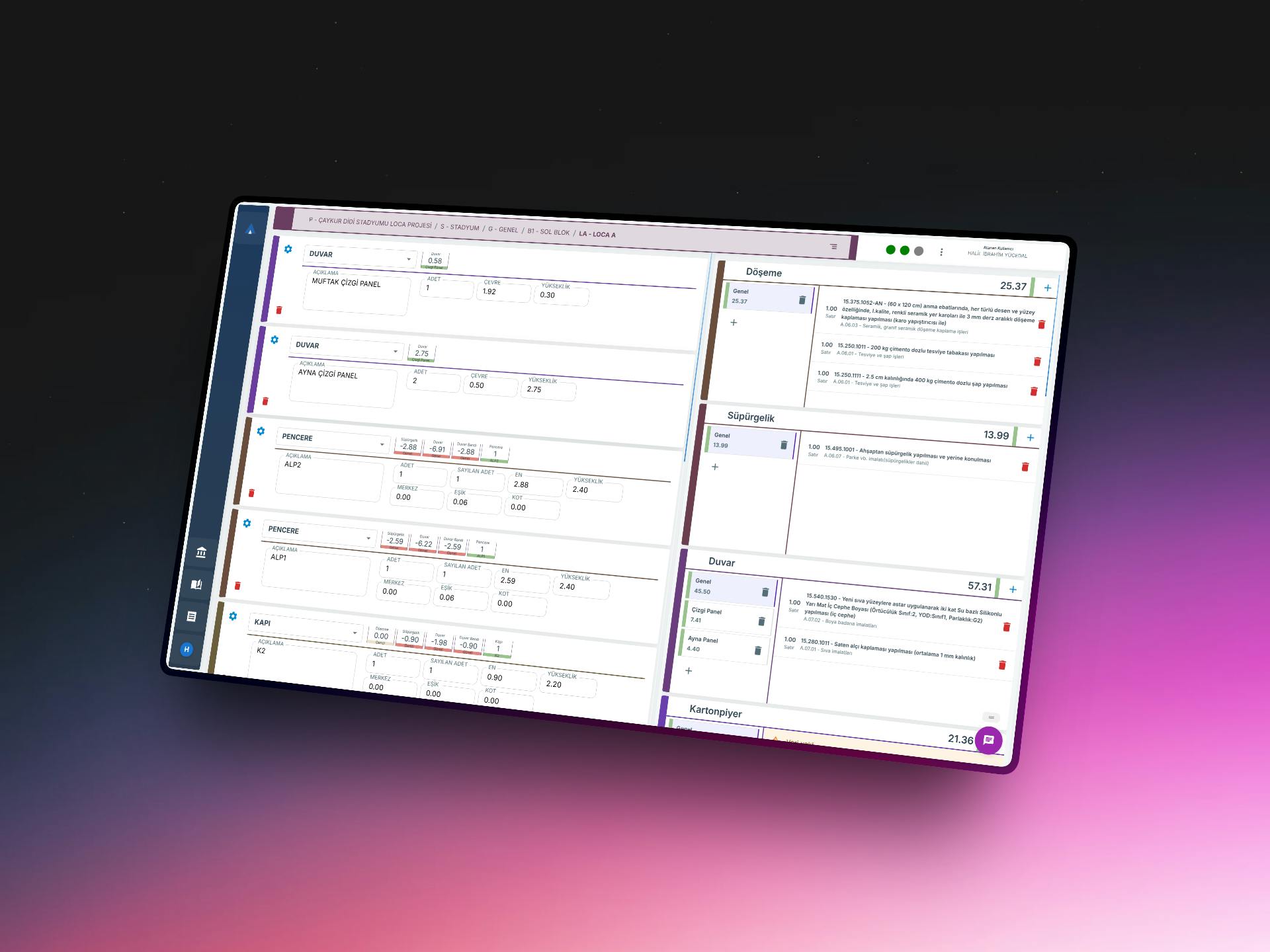
Formula-based row structure
Create much more detailed quantity takeoff calculations using only a small number of input fields.
Reduces data entry time while preserving quality standards.
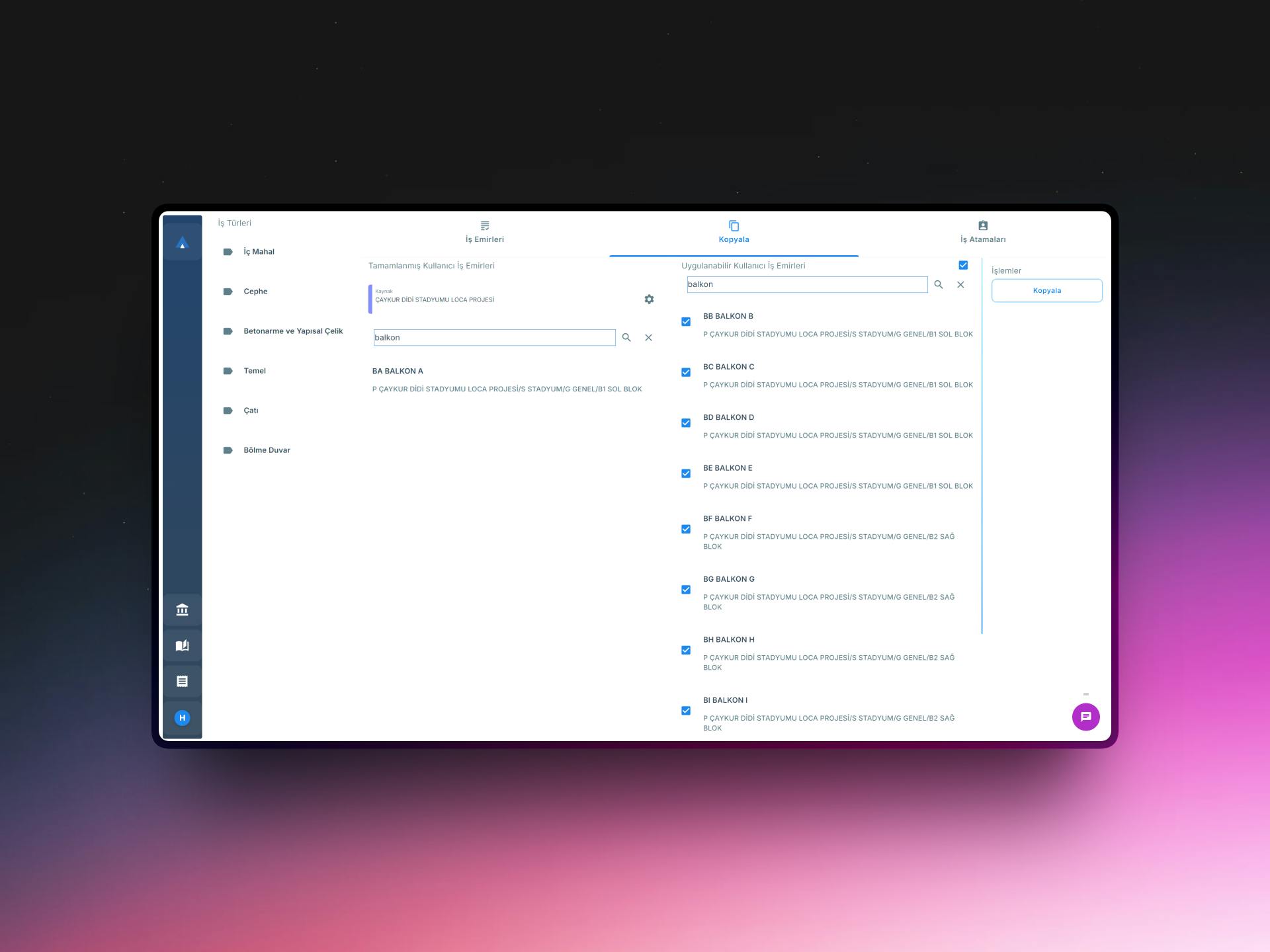
Revision-ready project structure
When the project changes, update outputs by continuing from the existing structure.
Reduces rework.
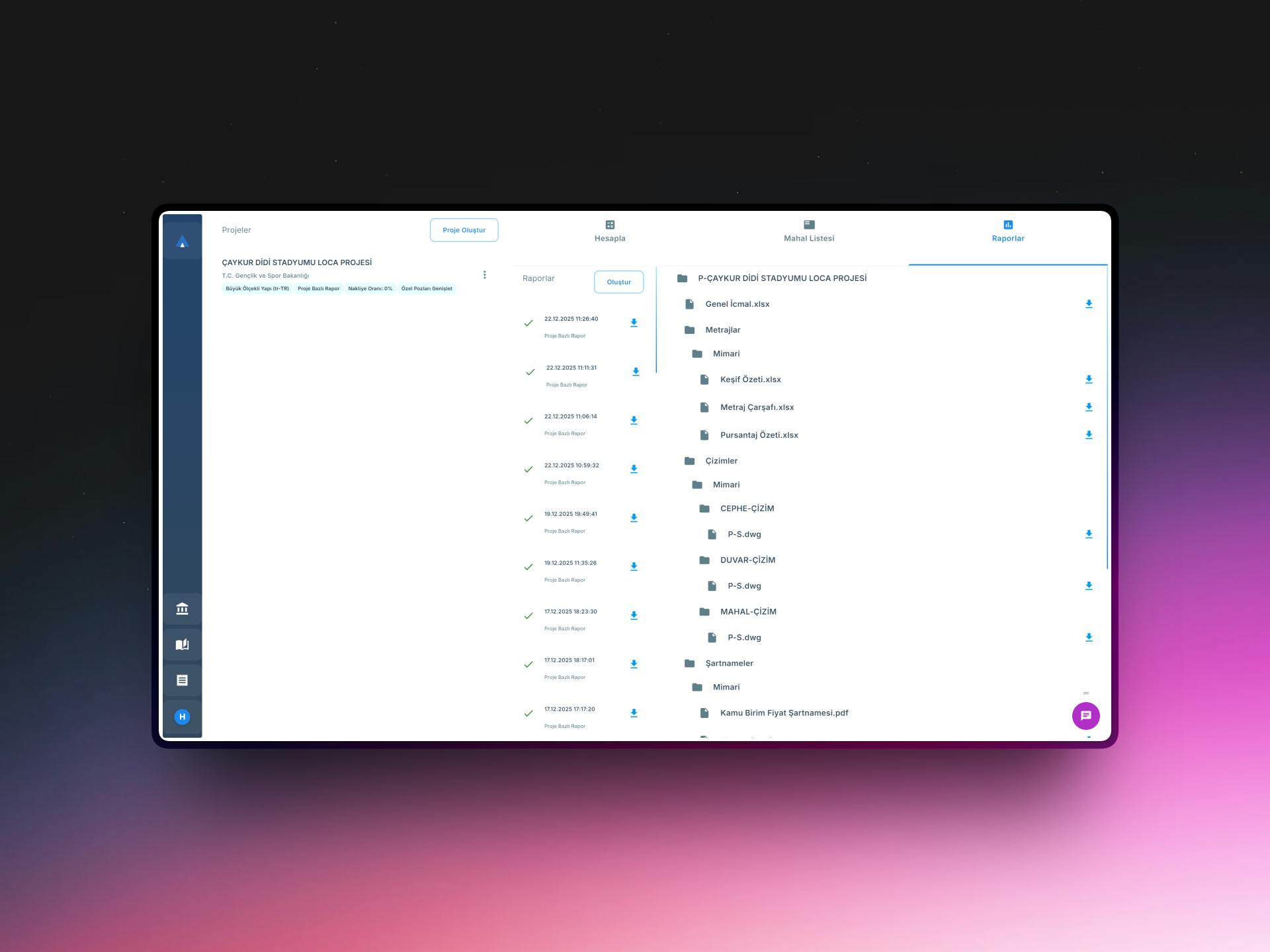
Reports and supporting document generation
Cost estimates and project-supporting outputs can be prepared within the same structure.
Speeds up delivery and improves output quality.
Try It
Try it yourself!
Discover how Approx works with a quick interactive demo
What you can produce
With Approx, you generate more than just quantity takeoff
At the end of the process, you get structured and repeatable outputs that can be shared with different stakeholders.
Cost estimation tables
Project-based total and detailed cost outputs
Quantity takeoff sheets
Detailed quantity structures generated through formula-based workflows
Specification-supporting documents
Detailed content supporting tender and project workflows
Revised reports
Outputs that can be updated quickly after changes
References
What do our users say?
Thanks to Approx, we can complete quantity takeoff and cost estimation work much faster and with far fewer errors. Not having to rebuild quantity takeoff work from scratch during project revisions creates a major advantage in terms of both time and effort.
Approx’s room-based cost breakdowns allow us to track project budgets in a much clearer and more transparent way. The step-by-step traceability of all calculations simplifies internal reviews and significantly increases confidence in the results.
With Approx, the significant reduction in manual work and the standardization of the calculation structure have helped us work much more systematically and efficiently as a team. Having the same calculation methodology for everyone reduces the risk of errors and improves consistency across workflows.
Transition process
The transition to Approx is shaped around your existing methodology
Because Approx is more than just a tool, your company’s working model is taken into account during setup.
- 1
Analyze the current workflow
Initial analysisYour company’s quantity takeoff, cost estimation, and reporting flow is evaluated.
Çıktı:Adaptation plan - 2
Set up templates and reporting structure
SetupDefine formulas, row types, and output structures tailored to your company.
Çıktı:Working system foundation - 3
Team onboarding
Initial trainingUsers are introduced to the system and workflow model.
Çıktı:Team ready for live usage - 4
Pilot usage
First project periodThe first projects are managed in a controlled way through the system.
Çıktı:Validated usage model
Plans
Choose the plan that fits your needs
Manage your quantity takeoff and cost processes with plans tailored to your usage needs and team structure.

Free
Free access to official (government) unit prices for individual users who want to explore.
- Unlimited access to official (government) unit prices
- Up-to-date price books and unit-price lookup
- Pricing detail and analysis view
- Sign up and start instantly — no credit card
No credit card required.
En iyi: Individual users and newcomers

Starter
Basic quantity takeoff and cost management for individual users.
- Unlimited access to public unit price libraries
- Single user
- Predefined report templates
- Standard support package
Prices do not include VAT.

Team
For teams working collaboratively on the same project.
- Unlimited access to public unit price libraries
- Includes 4 users
- Additional user support
- Predefined report templates
- Team-collaboration-ready architecture
- B2B support package
Prices do not include VAT.

Enterprise
For organizations with enterprise-level and specialized needs.
- Unlimited access to public unit price libraries
- Unlimited users
- Customizable reports
- Team-collaboration-ready architecture
- Enterprise support package
Prices do not include VAT.
Support
Frequently Asked Questions
What is Approx?
Approx is a cloud-based quantity takeoff and construction cost estimation software with AutoCAD integration, built for construction companies and technical offices. It combines takeoff, current Turkish public unit prices, cost calculation and reporting in one workflow.
Who is Approx for?
Approx is designed for contractors, construction consultancy firms and independent quantity surveyors who want to standardize technical office, planning, quantity takeoff and cost estimation workflows.
Does Approx work with AutoCAD?
Yes. The official Approx plugin on the Autodesk App Store lets you pick a project and work order inside AutoCAD, take room measurements (area, perimeter, height) from the drawing with the APL command and transfer them directly into Approx takeoff rows. See the AutoCAD docs.
Which public unit prices are included?
The unit price and rate libraries of the Ministry of Environment, Urbanisation and Climate Change (ÇŞİDB), İller Bankası, the General Directorate of Foundations, the General Directorate of Highways, the Ministry of Culture and Tourism, PTT and the Ministry of National Defence, queryable by publication period.
Is Approx free?
The free plan gives unlimited access to public unit prices and needs no credit card. Workplace features such as takeoff, work orders and report generation are part of the paid plans.
Can we migrate from Excel?
Yes. Approx is designed to bring Excel-scattered processes into a structured workflow. Existing takeoff rows can be imported with an Excel template and the transition is planned around your current methodology.
Can reports be customized?
Yes. Approx produces customizable reports and supporting documents based on the output structure your company needs.
Can Approx adapt to our existing methodology?
Yes. The platform's core strength is letting organizations carry their own methods into a more controlled digital structure.
Get Started
Let’s redesign your cost estimation workflow together
Request a demo to see how Approx can be adapted to your company’s current methodology.
- •Standardized Quantity Takeoff and Cost Calculation Structure
- •Project-specific calculation and report templates
- •Architecture suitable for team collaboration and enterprise use
Contact Us
Have a question or want to learn more about Approx? Fill out the form, and we’ll get back to you shortly.